



Commute cycling: equip yourself properly for everyday
September back-to-school brings commuters back to the road. Days grow shorter, showers return, and the home-to-work commute demands reliable equipment. A well-chosen phone mount and good lights are enough to transform a stressful journey into an efficient routine, five days a week.
- The choice between handlebar and stem depends on available space on your bars.
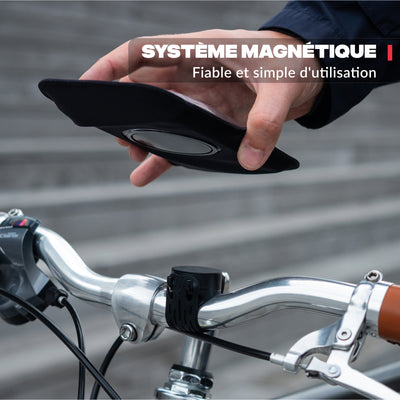
- A magnetic mount lets you check navigation without letting go of the handlebar.
- In France, front and rear lights are mandatory from sunset (Road Code, art. R313-1).
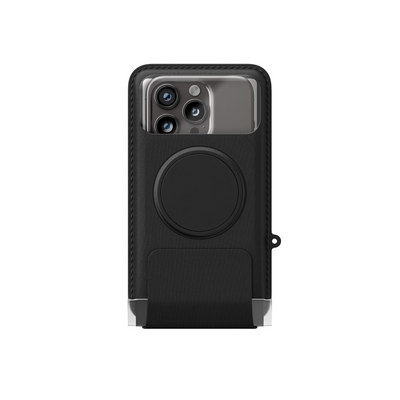
- A waterproof Sleeve protects your phone in the rain while keeping the screen readable and accessible.
Handlebar or stem: where to place your phone?
On a city bike or gravel bike, the bars are rarely empty. Front light, bell, sometimes a computer: space shrinks fast. The right location depends on what you already have fixed to your handlebar. Here are two options to consider before buying.
The handlebar mount attaches to the centre of the bars, at eye level. It's the most natural position for reading a GPS route. It suits all bikes whose bar centre is free. The mount rotates 360°, allowing you to orient the screen in portrait or landscape mode depending on the app used.
If the bars are cluttered, the stem is a solid alternative. It places the screen along the steering axis, slightly higher than the bars. It's often the most readable position at a glance, without lowering your head. The stem mount completely frees up the bars for other accessories.
The handlebar mount, a versatile solution for commuting
The PRO bike mount fits bars from 22 to 32 mm: the most common sizes on city bikes, hybrids and gravels. Mounting and removal are instant thanks to the magnetic attachment. You park your bike, you remove your phone: no cables, no straps to undo.
This matters when you repeat the action five times a week, all year round.

The magnetic mount, for hands-free navigation
On a daily commute, checking a map or reading a notification without stopping is essential. A magnetic mount lets you do this in less than a second. No unlocking, no handling at a stop: the screen is visible at all times, in your natural field of vision.
The magnetic system works with all phones, even with a case. If you already use a MagSafe-compatible case, no extra accessory is needed. For other cases, a thin metal plate fits discreetly between the phone and the case.
A well-positioned magnetic mount is hands-free navigation without compromise on safety or ride smoothness.

Compatible with your current phone and case
The mount accommodates smartphones up to current large formats. The 360° rotation lets you orient the screen according to the app: portrait for Waze or Google Maps, landscape for some bike GPS. It attaches to the bars without tools, in under a minute, and comes off the same way.
Magnetic lights: be seen morning and evening
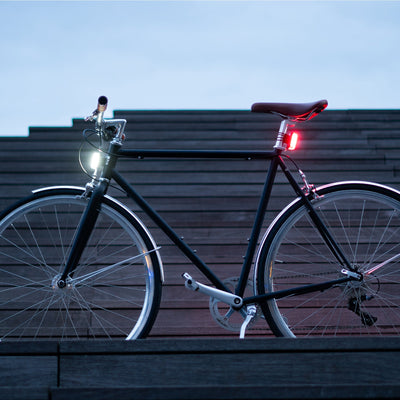
In France, the Road Code requires front and rear lights for any cyclist riding at night or in low visibility (art. R313-1). In September, sunrise and sunset times shorten week by week. By the second half, some morning or evening commutes happen in darkness.
The magnetic lights attach and detach without tools. One magnet, and the light is in place: no clips to force, no elastic that eventually gives way. This system simplifies recharging. You get home, you remove the light, you plug it in. It's ready the next morning.
The magnetic system has another advantage for commuting: you remove your lights before leaving your bike parked on the street or in the office hallway. No need to leave a ten-euro accessory on the bars all day.
In our test commutes in autumn conditions, one night's USB charge lasts two to three days of daily 20 to 30-minute commutes before recharging. A realistic cycle for regular commute use.

USB charging and magnetic attachment: the practical duo
Charging is via USB. No batteries to buy, no specific format. You charge at night, like your phone, and you leave in the morning. The magnetic attachment makes removal as quick as mounting, which really encourages removing the lights at every stop.
Protect your phone in rainy weather
September back-to-school often brings unexpected showers. A phone mounted on a handlebar mount without protection receives spray directly. A few weeks is enough to damage connectors or make the screen coating peel, depending on rainfall intensity.
The waterproof Sleeve solves this problem. The touchscreen remains usable through the transparent membrane. You can launch your GPS, take a call or change tracks without removing the phone. A rear pocket lets you slip in a travel pass or a bill.
Touchscreen accessible in the rain
The waterproof Sleeve is compatible with all touchscreens without exception. It replaces the mount on bad weather days: same attachment to the bar, same magnetic gesture to place and remove. Both accessories work together on the same handlebar mount, with no change of attachment.

The recap of the commute setup for September back-to-school
| Criterion | Handlebar mount | Stem mount |
|---|---|---|
| Screen position | Hand level, on the bars | Steering axis, slightly raised |
| Ideal if... | Bar centre is free | Bars are loaded (light, bell, computer) |
| Cyclist profile | City bike, hybrid, versatile gravel | Loaded bike, cargo, bike with many accessories |
| GPS readability | Good, in field of vision | Very good, in natural line of sight |
Three pieces of equipment cover most situations on a home-to-work commute. Each item meets a specific need. Together, they form a coherent setup you won't need to revisit for a long time.
The magnetic mount handles navigation. The magnetic lights handle visibility at low-light hours. The waterproof Sleeve takes over on rainy days, on the same handlebar mount. If your bars are cluttered, the stem mount replaces the handlebar mount without changing the rest of the setup.
Starting back-to-school with the right gear means leaving with no navigation stress, visible to other users, whatever the weather. It's also a setup you mount and remove in seconds, every morning and evening.
Frequently asked questions
Handlebar mount or stem mount: how to choose before back-to-school?
If the centre of your bars is free, the handlebar mount suits and installs in under a minute. If your bars are loaded (light, bell, computer), choose the stem mount. It frees up the bars and places the screen along the steering axis, often more readable on urban commutes.
Are magnetic lights enough for city commuting?
Yes, provided you use them correctly. In France, the law requires a white light at the front and a red one at the rear from sunset or in poor visibility. The magnetic lights meet this requirement. USB charging lets you keep them charged without hassle.
Does the waterproof Sleeve work with all phones?
Yes. The waterproof Sleeve fits smartphones up to current large formats. The touchscreen stays functional through the transparent membrane. It attaches to the same magnetic mount you use on dry days, without tools or fixture changes.
Can you navigate comfortably with the screen in landscape mode?
Yes. The PRO bike mount rotates 360°. Landscape mode is handy on some bike GPS apps that display elevation profile or a wider route view. On urban commutes, portrait mode remains most common: streets and turn-by-turn directions display better vertically.
Products from this article
One magnet, all your mounts — attach and detach with one hand.
Ride, run, pedal — stay connected
One magnet, all your mounts — attach and detach with one hand.
Discover Shapeheart mounts